The Sneaky Bug Behind Why parseInt Fails Inside Array.map()
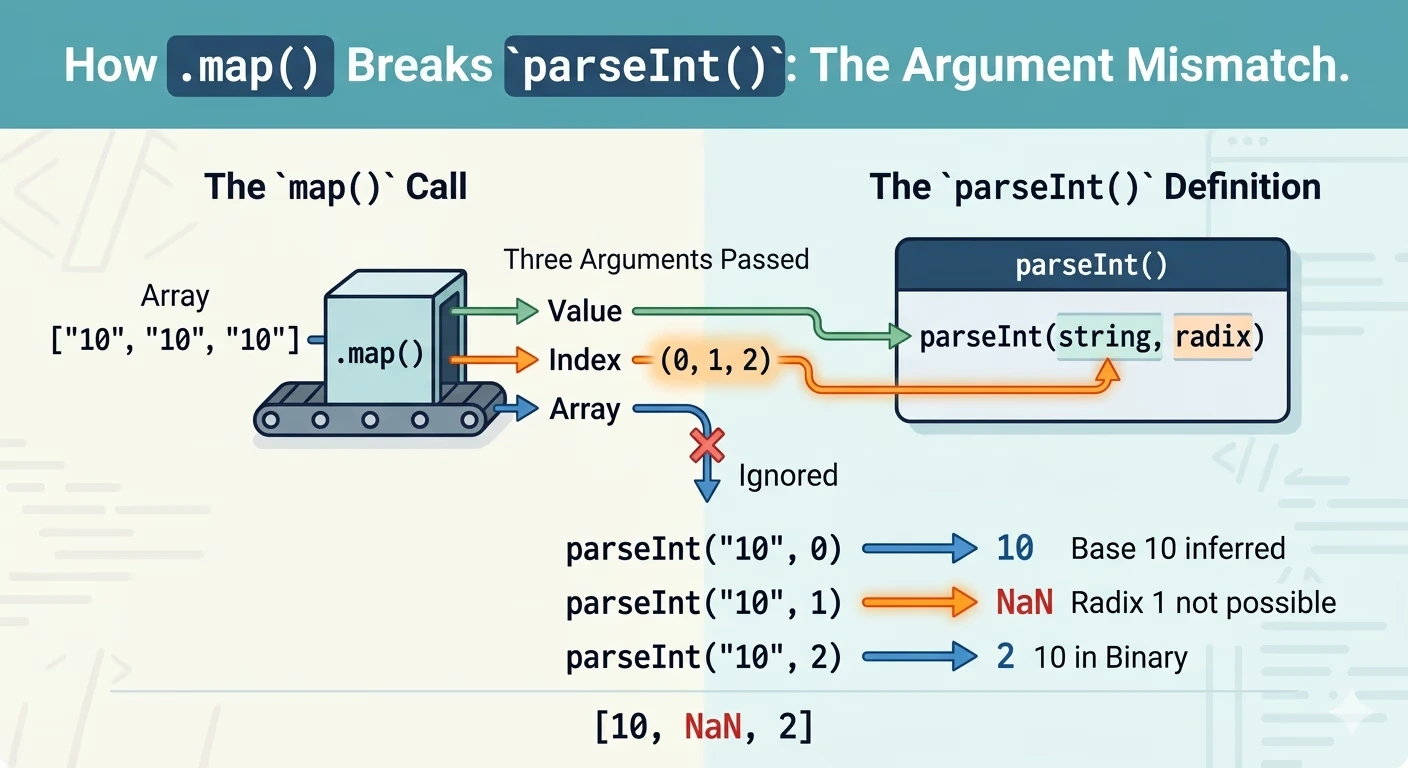
If you’ve been writing JavaScript for a while, chances are you’ve stumbled across this weird, slightly embarrassing bug:
["10", "10", "10"].map(parseInt);
// → [10, NaN, 2]
Wait… what? You expected [10, 10, 10]. You got a math nightmare. And now you’re staring at your screen wondering if JavaScript is broken (again).
Let’s unpack the “Argument Mismatch” that trips up even senior developers.
The Intuition (That Betrays You)
At first glance, this feels perfectly logical. You have an array of strings, you want numbers, and parseInt converts strings to numbers.
array.map(parseInt)It looks clean. Minimal. Elegant. And it is completely wrong.
What’s Actually Happening: The Argument Collision
The issue isn’t with parseInt or map individually; it’s the way they shake hands.
Array.map()passes three arguments to its callback:(value, index, array).parseInt()accepts two arguments:(string, radix).
When you pass parseInt directly into map, the index of the array is being forced into the radix (the number base) slot of parseInt.
Here is the step-by-step breakdown of the execution:
- Iteration 0:
parseInt("10", 0)- Result: 10. A radix of
0tells JS to “auto-detect.” Since “10” isn’t hex or octal, it defaults to base 10.
- Result: 10. A radix of
- Iteration 1:
parseInt("10", 1)- Result: NaN. Base 1 doesn’t exist in mathematics.
- Iteration 2:
parseInt("10", 2)- Result: 2. In Binary (Base 2), “10” represents the number 2.
Why This One Hurts: The Silent Failure
This bug is dangerous because it is silent. JavaScript won’t throw a TypeError or a warning in your console. It simply hands you incorrect data. If this happens inside a financial calculation or a coordinate system, you might not notice until your production data is already corrupted.
The Right Way to Do It
1. Be Explicit (Best Practice)
Don’t let JavaScript guess. Wrap the call in an arrow function to isolate the arguments.
["10", "10", "10"].map(val => parseInt(val, 10));
// → [10, 10, 10]
2. Use Number (The “Clean” Way)
The Number() constructor only takes one argument. The extra index and array passed by .map() are ignored, making it safer and cleaner for simple conversions.
["10", "10", "10"].map(Number);
// → [10, 10, 10]
Note: Number is stricter than parseInt. It won’t “guess” (e.g., parseInt('10px') is 10, but Number('10px') is NaN).
3. The Unary Plus
Short and effective, though slightly less readable for beginners.
["10", "10", "10"].map(x => +x);